Number of dice
Modifier
Online Dice Roller: d4, d6, d8, d10, d12, d20 and Custom Dice
Roll a d4, d6, d8, d10, d12, d20 or a custom die with up to 100 sides. Roll up to ten dice at once, add a modifier and read every die and the total.
This dice roller is a spinning wheel with the faces of your die written on its slices. Pick a die, choose how many to roll and a modifier, then press Spin, click the wheel, or press Ctrl+Enter (Cmd+Enter on a Mac). The card that opens gives the total and every die that made it up.
It rolls one kind of die at a time, from a d4 to a d20 or any custom die with 2 to 100 sides, and up to ten dice at once. It does not keep the highest die or drop the lowest for you, and a later section lists what else it leaves out.
How to roll dice
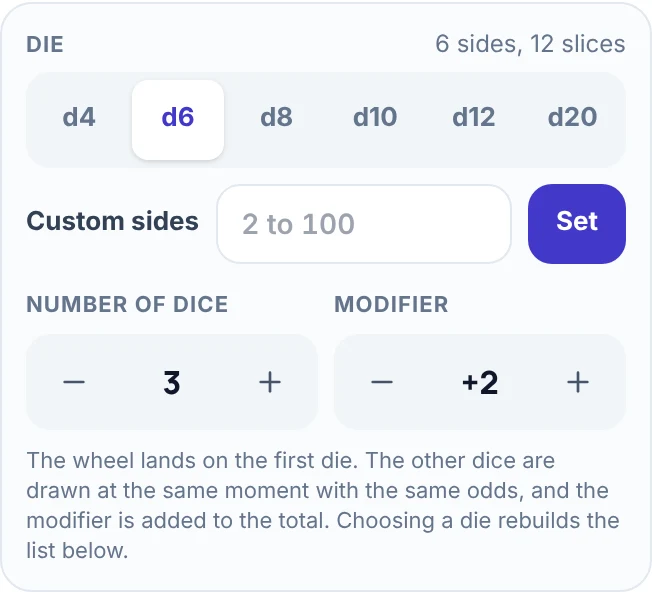
- Choose the die. In the Entries tab, press d4, d6, d8, d10, d12 or d20. The wheel rebuilds with the faces of that die. On phones and tablets, the die, the number of dice and the modifier sit under the wheel.
- Set the number of dice and the modifier. Number of dice goes from 1 to 10 and Modifier from -99 to +99, one step for each press of the - and + buttons. Until your first roll, a line above the tabs repeats your choice, for example "Rolling 3d6+2".
- Spin. Press Spin, click the wheel, or press Ctrl+Enter (Cmd+Enter on a Mac). The wheel turns for about 5 seconds. Under Spin length in the Spin tab, Fast takes about 3 seconds and Slow about 7.
- Read the card. You rolled shows the total in large type, and the line under it lists every die and the modifier.
- Roll again. Spin again rolls with the same settings. Share result sends the roll and a link to this page through your device's share menu, or copies them to the clipboard.
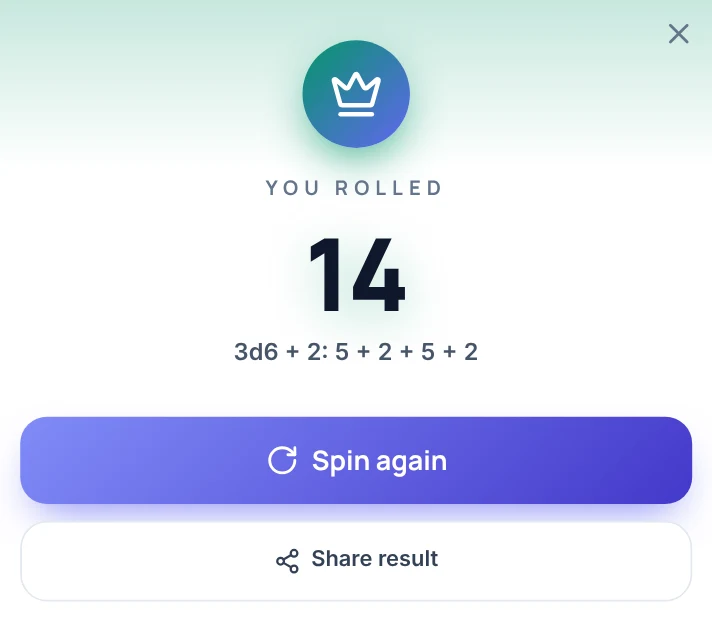
In the line "3d6 + 2: 5 + 2 + 5 + 2", the first three numbers are the three dice and the last is the modifier, so the total is 14. With one die and no modifier, the card shows only the number and the name of the die, such as 1d20. The panel keeps the last roll as one chip for each die, with the modifier and the total beside them.
The dice and their odds
Every face of a die has the same chance. The d10 here runs from 1 to 10, not 0 to 9.
| Die | Faces | Chance of each face | Average of one die | Slices on the wheel |
|---|---|---|---|---|
| d4 | 1 to 4 | 25% | 2.5 | 12 |
| d6 | 1 to 6 | 16.7% | 3.5 | 12 |
| d8 | 1 to 8 | 12.5% | 4.5 | 8 |
| d10 | 1 to 10 | 10% | 5.5 | 10 |
| d12 | 1 to 12 | 8.3% | 6.5 | 12 |
| d20 | 1 to 20 | 5% | 10.5 | 20 |
A die with six or fewer faces repeats its faces round the wheel so the slices stay wide enough to read: a d6 shows each number twice and a d4 shows each number three times. Every face repeats the same number of times, so the odds do not change.
The modifier is added once to the total, not once for each die. A roll of 3d6 + 2 gives a total from 5 to 20, with an average of 12.5.
Roll a custom die
Type a whole number from 2 to 100 into Custom sides and press Set. The wheel rebuilds with that many faces. For a percentile roll, set 100 to get a d100. On a 100-sided die the slices are thin and the numbers small, so read the result on the card.
For faces other than 1 to N, open Bulk edit in the Entries tab, type one face per line and press Apply list. Six faces of -1, -1, 0, 0, 1 and 1 give a Fate-style die. The card then calls your dice "custom dice".
If every face is a plain number, the total is added up as before. Faces made of words, and numbers written with a plus sign such as +1, are listed on the card but not added, so write 1 instead of +1 when you want a total. Pressing a die button again, even the one that is already selected, puts the standard faces back.
Rolling several dice
With more than one die, the wheel stops on the first die. The other dice are drawn at the same moment from the same faces with the same odds, so the wheel shows one number while the card shows them all. The dice are independent of each other, and the total is the sum of the dice plus the modifier.
Two d6 give totals from 2 to 12, and the totals are not equally likely, because more pairs of dice add up to 7 than to any other total:
| Total of 2d6 | Pairs that make it | Chance of each total |
|---|---|---|
| 7 | 6 of 36 | 16.7% |
| 6 or 8 | 5 of 36 | 13.9% |
| 5 or 9 | 4 of 36 | 11.1% |
| 4 or 10 | 3 of 36 | 8.3% |
| 3 or 11 | 2 of 36 | 5.6% |
| 2 or 12 | 1 of 36 | 2.8% |
Three d6 give totals from 3 to 18, and 10 and 11 are the most common, at 12.5% each.
Read your roll stats
Open the Results tab. Roll stats shows Rolls (spins), and the Average, Highest and Lowest of your totals, with the modifier included. Under them, Face counts shows how many times each face has come up across every die you rolled, as a count and a percentage. Stats start again when you pick a different die, and Reset stats clears them by hand.
Below the stats, Winner history lists your last 50 rolls, newest first, in the form "3d6 + 2: 5 + 2 + 5 + 2 = 14". Copy results copies the list and Clear empties it.
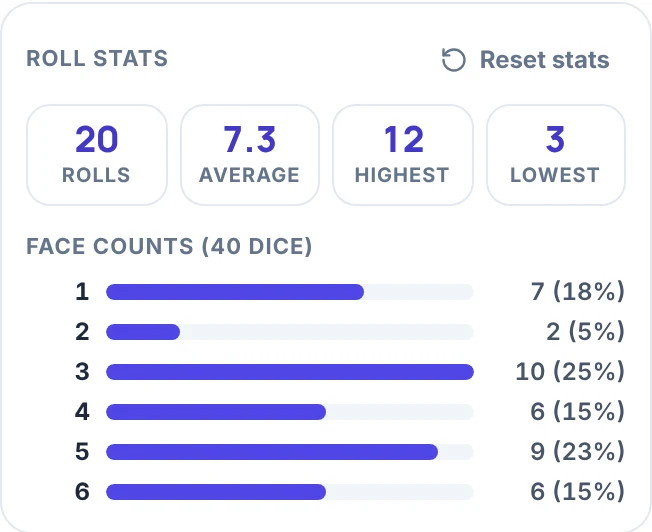
This run shows how lumpy a small sample is. Across 40 dice, face 2 came up twice (5%) and face 3 ten times (25%), where an even split would be about 6.7 times (16.7%) for each face. That is ordinary, and 20 rolls are too few to say anything about fairness.
How the result is chosen
Every face has the same chance. The browser's cryptographic random number generator picks the result first, and it redraws the rare values that would tilt the odds toward low numbers. The wheel then turns to land on that result, so how hard you click does not change it. Each extra die is drawn the same way.
Three things change the odds, and none of them is on by default:
- Weights, a button in the Entries tab, can make some faces more likely. It is off until you turn it on.
- Elimination, one of the three choices under Mode in the Spin tab, takes the face the wheel stops on off the wheel. After one roll of a d20 in Elimination, the wheel had 19 faces left. Keep Mode on Normal for dice.
- Adding, removing or repeating a face by hand changes the odds, and the card then says "custom dice".
Chance still makes streaks. On a d20, a 1 followed by another 1 happens one time in 400, and it says nothing about the wheel.
Where it helps
- A tabletop game. For a d20 check or attack, pick d20 and press + on Modifier until it shows your bonus. For damage such as the 8d6 of a Fireball in D&D 5e, pick d6 and set Number of dice to 8. The card adds the total.
- Advantage or disadvantage. The roller does not pick the higher or lower die for you. Roll 2 dice on a d20, read the two numbers on the card and ignore the total.
- A board game with a missing die. Pick d6, and set Number of dice to 2 for a game that uses two.
- A classroom probability lesson. Roll 2d6 twenty times on a projector, then open Results to read the average, the highest and lowest totals and the face counts together.
- A video call or an online game. One person shares their screen and rolls, and everyone reads the card. Share result copies the roll with a link, or sends it through your device's share menu.
Sound, full screen and sharing
- The speaker button turns the sound off. The Sound tab sets the volume and picks the spin sound and the winner sound, or none.
- Fullscreen fills the screen with the wheel, which helps on a TV or projector. The button appears only in browsers that support full screen.
- Save and share can save the wheel as a link that includes your faces and colors, download a PNG of the wheel as it looks now, or give you an embed code.
What this dice roller does not do
- It is a wheel with numbers on it. It does not show 3D dice tumbling on a table.
- One roll uses one kind of die. To roll a d20 and two d6, roll twice.
- It has no box for typed notation such as 3d6+2. You set the die, the number of dice and the modifier with buttons, one step per press, and reloading the page returns it to 1d6.
- It does not keep the highest dice, drop the lowest, reroll or explode dice.
- It stops at 10 dice, a modifier of -99 to +99 and a custom die of 100 sides. For a number in any other range, use the Random Number Generator.
More wheels for the same game
The Coin Flip settles a choice between two outcomes, and the Spin the Wheel page picks one of any list of names or options you type in. To decide who rolls first, use the Random Name Picker.
Frequently asked questions
The dice roller has buttons for the d4, d6, d8, d10, d12 and d20, and a Custom sides box for any die from 2 to 100 sides. Every face has the same chance, and the d10 runs from 1 to 10.
Up to 10 dice of one kind, with a modifier from -99 to +99. The total is the sum of the dice plus the modifier, and the result card lists every die.
Press d6 in the Entries tab, then set Number of dice to 2, 3 or 4. Press Spin, and the card shows the total and every die. To roll something like 3d6+2, set Number of dice to 3 and Modifier to +2.
No. The roller has no box for typed notation. You set the die, the number of dice and the modifier with buttons, so 3d6+2 is a d6, 3 dice and a modifier of +2. The line above the tabs repeats your choice, for example "Rolling 3d6+2", so you can check it before you spin.
With the default settings, yes: the browser's cryptographic random number generator picks the result before the wheel turns, so every face has the same chance. Weights, the Elimination mode and editing the faces by hand change the odds, so leave them alone when you want a normal die.
Type 100 into Custom sides and press Set. The wheel gets 100 faces, and the result card shows the number in large type.
For the rolls themselves, yes. Pick d20 and add the modifier for a check or an attack, or pick d6 and set the number of dice for damage such as 8d6. It does not pick the higher or lower d20 for advantage or disadvantage: roll 2 dice and read both numbers on the card.
No. One roll uses one kind of die. Roll the d20, then pick d6, set the number of dice to 2 and roll again.
Yes. The Results tab lists your last 50 rolls, newest first, with Copy results and Clear, and Roll stats show the rolls, average, highest, lowest and how often each face came up. Roll stats start again when you pick a different die.
The wheel stops on the first die. The other dice are drawn at the same moment with the same odds, and the card shows all of them and the total.