Heads
00%
Tails
00%
Streak
0
Coins
Flip speed
Heads or Tails Generator: Flip a Coin Online
Flip a 3D coin or spin a two-slice wheel. Toss up to ten coins at once, rename the sides and keep a running tally.
This heads or tails generator flips a 3D coin and lands on Heads or Tails, with the same chance for each. Press Flip, tap the coin or press Space, and a card names the side it landed on. You can flip from 1 to 10 coins at once and rename the sides.
The page has two views. Coin is the default. Wheel puts the same two sides on a two-slice spinner, and it is also where you can change the odds. Both views feed one tally. A later section lists what the tool leaves out.
How to flip a coin here
- Choose the view. Coin and Wheel are the two buttons at the top of the panel. On phones and tablets they sit under the coin.
- Set the coins and the speed. In Coin view, Coins goes from 1 to 10. Flip speed is Fast, Normal or Slow, which take about 1.2, 2 and 3 seconds.
- Flip. Press Flip, tap the coin or press Space. Ctrl+Enter (Cmd+Enter on a Mac) works too. Space does not flip while you are typing in a box or while a result card is open.
- Read the card. "The coin landed on" is followed by the face and its name in large type.
- Flip again. Flip again on the card flips once more. Share result sends the result and a link to this page through your device's share menu, or copies them to the clipboard.
The coin is drawn in the browser, not photographed. Heads shows the two halves of the ShuffleWheel logo, Tails shows an eight-slice wheel, and the name of the side is written on the rim.
On phones, Entries and Results open from the bar at the bottom of the screen, and Spin and Sound sit inside Settings. The rest of this page calls them tabs.
Flip more than one coin
Raise Coins to flip up to ten at once. Every coin is its own 50/50 draw, so five coins are five separate flips, not one flip with a bigger result. The card shows each coin, a count and the order, one letter per coin.

In this flip, three coins landed Heads and one landed Tails, so the card reads "3 Heads, 1 Tails" and the line under it reads H H H T. Four coins can also land 2 and 2, or all the same. Nothing pushes them to balance.
In the tally, Coins counts every coin and Flips counts presses of the button, so a flip of ten coins adds 10 coins and 1 flip. Streaks run through the coins in the order shown, so a streak can carry over from one flip to the next.
Read the tally and the streaks
The strip in the panel shows Heads and Tails with a count and a percentage, rounded to a whole percent, and the current Streak as a number and the first letter of the side. The Results tab adds a bar, the Coins and Flips counts, the Current streak and the Longest streak. Reset tally sets them back to zero.
Under the tally, Winner history lists your last 50 flips, newest first. A flip of several coins is listed with its count and each coin, as in "3 Heads, 2 Tails (H T H H T)". Copy results copies the list. Clear empties it and resets the tally. The tally and the history live on the page only, so if you reload it, both start again.
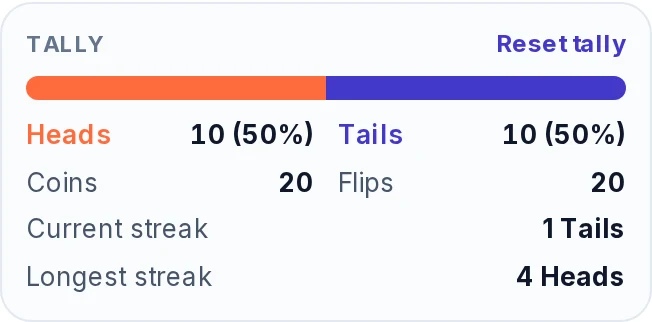
The picture comes from a real run of 20 single flips on Fast. They came up in this order:
H T T H H H H T T T T H H T T H T H H T
The tally ended at 10 Heads and 10 Tails, so the split looks perfectly even. The sequence is not: it holds four Heads in a row and then four Tails in a row. Longest streak shows 4 Heads because it keeps the first run to reach that length. Current streak shows 1 Tails because the last flip was a Tails that followed a Heads.
A small sample can look even or lopsided by chance alone. As the flips pile up, the percentages tend to move toward 50%, but the gap between the two counts can still grow.
How the result is chosen
In Coin view, every coin has exactly a 50% chance of landing Heads and a 50% chance of Tails. The browser's cryptographic random number generator draws each coin before it moves, and the toss then ends on the face that was drawn. How hard you click, when you press and which Flip speed you choose do not change the result.
Weights and extra outcomes do not touch the coin. They apply only in Wheel view, which a later section covers.
Streaks are normal
A run of the same side is normal in fair flips, and it does not make the next flip more likely to switch. Each flip is independent of the ones before it, and expecting a switch after a run is called the gambler's fallacy.
Five Heads in a row, starting from a particular flip, has a 1 in 32 chance (3.1%). Over a longer session, the chance that a run of five or more of the same side shows up somewhere is much higher:
| Flips | Run of 5 or more | Run of 6 or more | Run of 7 or more |
|---|---|---|---|
| 10 | 21.7% | 9.4% | 3.9% |
| 20 | 45.8% | 23.7% | 11.5% |
| 50 | 82.1% | 54.4% | 30.9% |
| 100 | 97.2% | 80.7% | 54.2% |
The table counts every possible sequence of a fair coin, so the percentages are exact. A run can be Heads or Tails. Longest streak in the Results tab shows how long your own longest run was.
Flip a coin or spin the wheel
Wheel view does the same job with a two-slice spinner: press Spin and the pointer lands on Heads or Tails. It uses the same two names and the same tally, and a wheel result counts when it lands on one of the two sides.
Choose the wheel when a turning wheel with a pointer is easier for a group to follow, for example on a projector or a shared screen. A spin takes about 3, 5 or 7 seconds under Spin length in the Spin tab. That setting is separate from Flip speed.
The wheel can do what the coin cannot, which is change the odds. Open the Entries tab, press Weights and type a number beside each side. Heads at 3 and Tails at 1 gives Heads three chances in four, and the slices on the wheel show it.
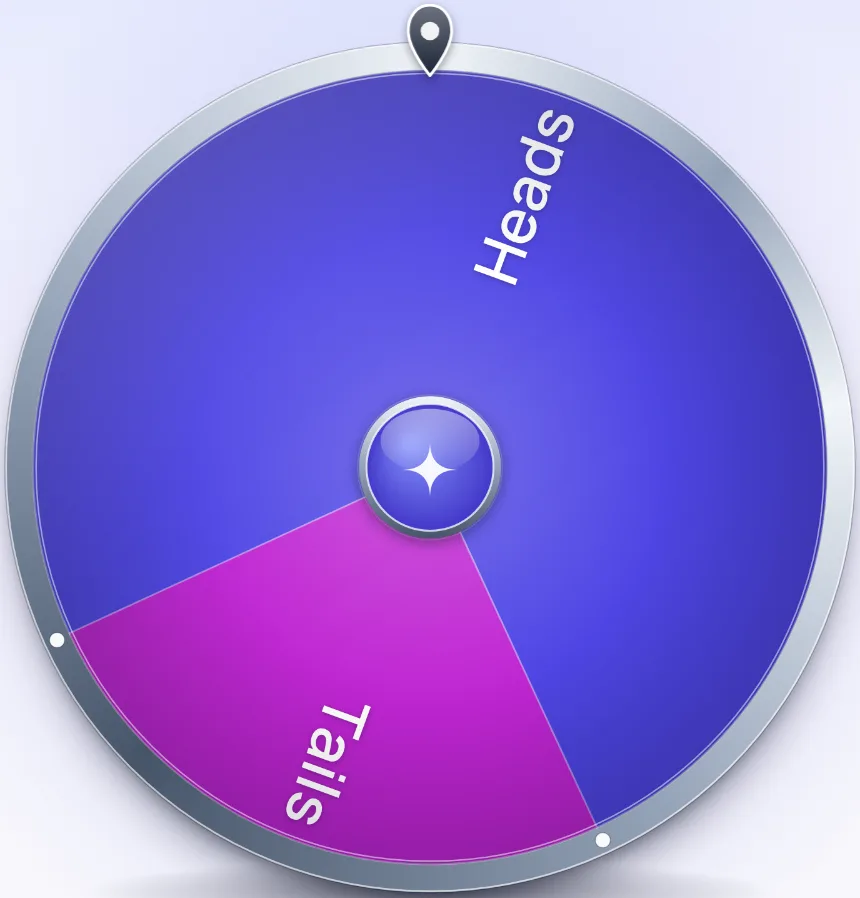
Each spin picks a side by its weight, so over many spins Heads comes up about three times in four. Leave both weights at 1 for an even wheel.
Leave Mode on Normal for a heads or tails wheel. Elimination, one of the three choices in the Spin tab, takes the side the wheel stops on off the wheel.
You can also add a third outcome, such as "Pass", in the Entries list. The tally still counts only Heads and Tails. For a longer list of names or options, the Spin the Wheel page is built for it.
Rename the sides
Type up to 16 characters into Side 1 and Side 2 at the top of the Entries tab. The names go on the coin's rim, on the two wheel slices and in the tally. Two names such as "Pizza" and "Tacos" turn the flip into a choice between two things, and Back to Heads and Tails puts the originals back.
Renaming a side puts the wheel back to just the two sides, so rename first and add weights or outcomes afterwards.
Where it helps
- Who goes first. One person calls Heads or Tails, then flips. Agreeing on the call before the coin moves is what makes the result binding.
- A tie between two options. Rename the sides to the two options and flip once.
- Best of three. Set Coins to 3 and flip once. The side with two or more coins wins, and an odd number of coins cannot tie.
- A probability lesson. Ask the class to predict the split after 10 flips. Set Coins to 10, flip on a projector, then read the percentages and the Longest streak in the Results tab. The Fullscreen button, where the browser supports it, fills the screen.
- A video call or a stream. One person shares their screen and flips, and everyone reads the card. Share result sends the result and a link, or copies them.
- A game with a rarer outcome. In Wheel view, give one side a smaller weight than the other and spin.
What this heads or tails generator does not do
- It does not show a real coin. The coin carries the ShuffleWheel logo on Heads and a wheel on Tails, and there are no currency designs.
- It flips 1 to 10 coins at a time. For a longer run, press Flip again, and the tally adds the flips up.
- It has no call-it step. The page does not record your guess or score it.
- It does not save the tally or the history. Press Copy results before you leave the page.
- It does not flip when you shake your phone.
More ways to decide
For a bigger on-screen answer to a yes or no question, use the Yes or No Wheel. To pick from a list of names or options, use Spin the Wheel, and for a number in a range, the Random Number Generator. When the odds of each option should differ, the Decision Maker Wheel is made for that. The Dice Roller covers games that call for a die.
Frequently asked questions
In Coin view, yes: the browser's cryptographic random number generator draws each coin with exactly one chance in two, and the coin then lands on that face. In Wheel view, the odds follow the slices, so they stay 50/50 unless you change Weights or the Mode.
Press Flip under the coin, tap the coin or press Space. A card shows whether it landed on Heads or Tails, and Flip again flips once more.
Yes. Set Coins from 1 to 10. The card lists each coin and gives a count, and the tally adds every coin.
Not in Coin view, which is always 50/50. In Wheel view, open the Entries tab, press Weights and give Heads a larger number than Tails. With 3 and 1, Heads takes three of the four parts of the wheel.
Fair flips often make runs of the same side. In 100 flips there is about a 97% chance of a run of five or more of the same side. Each flip has nothing to do with the one before it.
Yes. The panel shows the Heads and Tails counts with percentages and your streak, and the Results tab adds the longest streak and a list of your last 50 flips. If you reload the page, they start again.
Yes. Type up to 16 characters into Side 1 and Side 2 in the Entries tab. The words go on the coin, on the two wheel slices and in the tally.
Yes. Choose Wheel at the top of the panel for a two-slice spinner with Heads and Tails. Press Spin, click the wheel or press Space, and the pointer picks one side.