Teams
Max per team
8 names make 2 teams of 4.
Random Team Generator: Split Any List Into Fair Teams
Add your names, choose the number of teams or the most people per team, and press Make teams. The wheel spins once and every team appears on one board.
The random team generator splits a list of names into teams. You add the names, set either the number of teams or the most people per team, and press Make teams. The wheel spins once as the shuffle, then a board shows every team at the same time. Team sizes never differ by more than one person.
The tool starts with eight example names (Maria, Jose, Andrea, Paolo, Kim, Liza, Ben and Carla) so you can try it before you type anything.
How to make random teams
- Put your names on the wheel. Type one into Add a name, paste a list into Bulk edit, or use Import for a CSV, Excel or PDF file or a Google Sheets link. One wheel holds up to 1,000 names.
- Open the Entries tab and set Teams or Max per team. The two boxes are linked: change one and the other is worked out. The line under them tells you the result, for example "8 names make 3 teams of 3 or 2."
- Press Make teams, click the wheel, or press Ctrl+Enter (Cmd+Enter on a Mac).
- Read the Your teams board. Press Reshuffle to draw again with the same settings, or use Copy, CSV or Image to take the teams with you.
On phones and tablets the Teams and Max per team boxes sit under the wheel, and the options are in the Entries panel.
How big each team is
The generator spreads the names as evenly as it can. If the list does not divide evenly, a few teams get one extra person. Which teams get the extra person is also random.
| Names | Setting | Result |
|---|---|---|
| 8 | 3 teams | 3 teams of 3 or 2 |
| 11 | 3 teams | 3 teams of 4 or 3 (4, 4 and 3) |
| 20 | 4 teams | 4 teams of 5 |
| 25 | Max per team 6 | 5 teams of 5 |
| 30 | 4 teams | 4 teams of 8 or 7 |
Setting Max per team gives you as few teams as keep every team at or under that number. With 25 people and a limit of 6, you get 5 teams of 5, not 4 teams of 6 and one of 1. The smallest split is 2 teams, and the most teams you can ask for is one per person. You need at least two names.
Is it a team picker wheel?
Yes, if "team picker wheel" means a wheel that splits a group of people into teams. Pressing Make teams spins the wheel, and the board that follows shows all the teams at once. The wheel is the moment of the shuffle. It does not hand out one person per slice, and where the pointer stops does not decide the teams. The teams come from a shuffle of the whole list, done with the browser's cryptographic random number generator before the board opens.
Keep people together or apart
Under the team boxes sit three switches. Each one is off until you press it.
- Keep together. Type one group per line, with the names split by commas. Each group lands in the same team. Groups that share a name are merged into one.
- Keep apart. Type one group per line. While there are enough teams, no two people on a line share a team. If a line is longer than the number of teams, the group is spread as evenly as possible.
- Pick a leader. One random person in each team is marked as the leader.
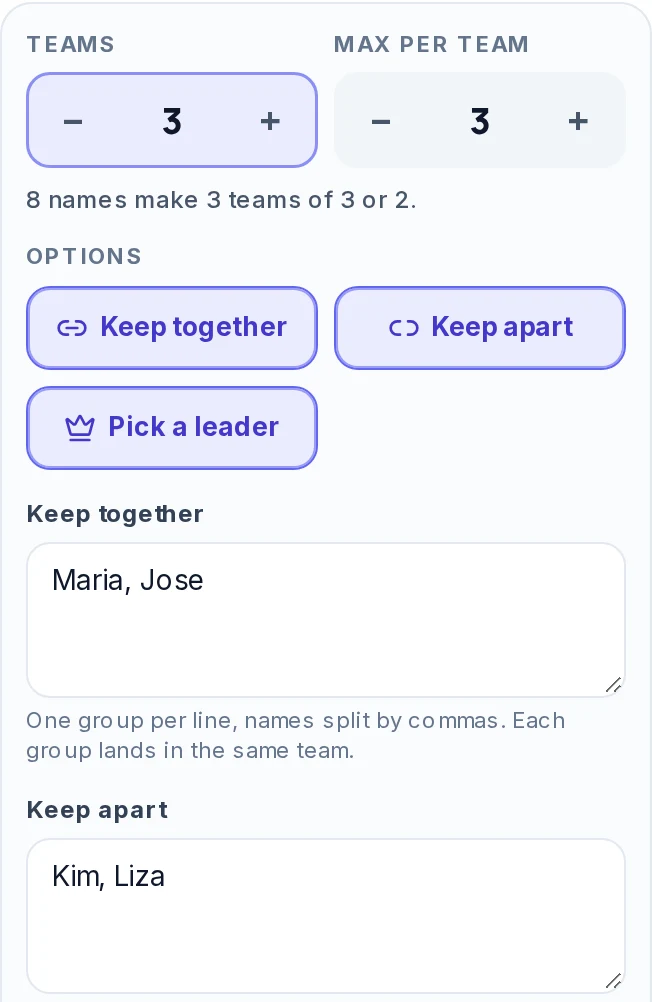
Names in the rules are matched to the names on the wheel, and capital letters do not matter. A name that is not on the wheel is left out, and the panel lists it so you can fix a typo.
Keep apart doubles as a way to balance teams. Put your four strongest players on one line and, with four teams, each team gets one of them. With two teams, each gets two. The tool has no skill scores, so you decide who goes on that line.
Some rules cannot be met together. A keep together group larger than a team is one example, and the tool says so instead of ignoring the rule. A rule set that cannot work with the number of teams you chose shows a message on the board and no teams.
The teams board
After each draw, Your teams shows one card per team with its size and its people. A team name is a text box: click it to rename the team, and the new name stays when you reshuffle. With Pick a leader on, the leader has a crown and the word Leader.
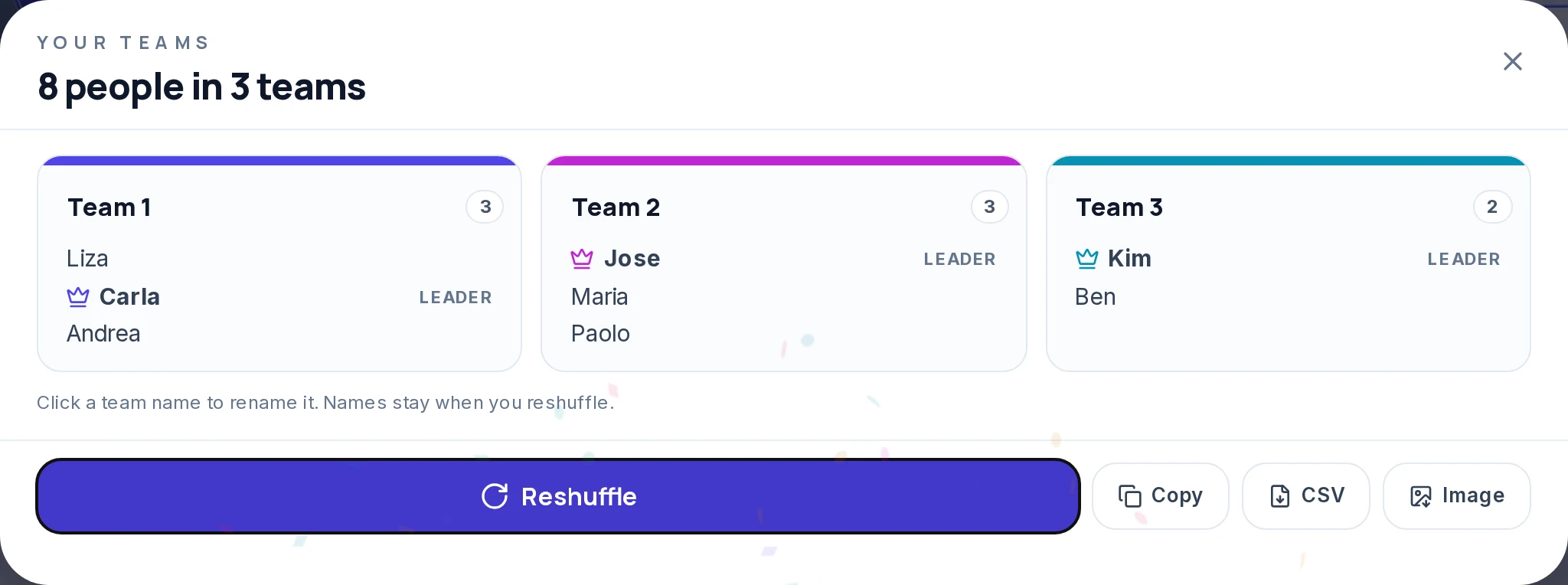
Four buttons sit on the board:
- Reshuffle
Draws again from scratch with the same names and settings.
- Copy
Puts one line per team on the clipboard, such as "Team 1: Ana, Ben, Carlo", with "(leader)" after a leader's name.
- CSV
Downloads a file with one row per person: Team, Name, and Leader when leaders are on.
- Image
Downloads a PNG of the teams as cards. A very long list can be too large for one image, and the tool then suggests the CSV.
Why the teams are fair
With no rules switched on, the generator shuffles the whole list with a Fisher-Yates shuffle that uses the browser's cryptographic random number generator (crypto.getRandomValues). It then deals the names out to the teams like cards. Every possible split of the list is equally likely, and no name is more likely to land in a particular team than any other.
Rules change that on purpose. With Keep together or Keep apart on, the tool places groups first and then fills the teams, so the split is random inside what the rules allow, not across every possible split.
Reshuffle gives a new split each time. If a result looks odd, say two friends are together by chance, that is what random looks like. A redraw on a shared screen, in front of the group, shows the draw was not adjusted by hand.
Where it helps
- Classroom groups. A teacher with 27 students and a limit of 4 per group gets 7 groups, six of 4 and one of 3. Switch on Keep apart for two students who struggle to work together, and switch on Keep together for a student who needs a particular partner.
- Sports and PE. Paste the roster and make two teams for a scrimmage. Put the best players on one Keep apart line so the sides are even, and turn on Pick a leader for the captains.
- Workshops and breakout rooms. Import the attendee list and set Max per team to 5. Rename the teams to room names, then copy the result into the chat.
- Office pairs and projects. Set the number of teams to half the headcount for pairs. Keep apart stops two people from the same department being paired.
- Game night. Add everyone's name, make two teams, and rename them. For something to play, try the Charades Generator, and for a first-turn decision flip a coin.
What this generator does not do
- It splits by names only. There is no skill field, age or gender setting, so balancing is manual through Keep apart.
- It does not set a different size for each team. All teams are as even as possible.
- It does not let people join a team themselves. You make the list.
- Weights, which exist on the wheel panel for other wheels, are not used when making teams.
- A name entered twice counts as two people, so press Remove duplicates first if your list has repeats.
- It does not save your names between visits. Copy or download the teams if you need them later.
Other wheels for related jobs
- To pick one person, use the Random Name Picker.
- To choose which team goes first, use the Coin Flip or the Dice Roller.
- For acting games after the teams are set, use the Charades Generator.
- For a draw with any list you write yourself, use Spin the Wheel.
Frequently asked questions
It shuffles your list of names with a cryptographic random number generator and deals them out to the teams like cards. You choose the number of teams or the most people per team, and team sizes never differ by more than one.
Yes. Set Max per team and the tool works out the number of teams, or set Teams and it works out the sizes. The two boxes are linked, so changing one updates the other.
Yes. With no rules switched on, the generator shuffles the whole list with a Fisher-Yates shuffle that uses the browser's cryptographic random number generator, then deals the names out to the teams like cards. Every possible split of the list is equally likely.
A few teams get one extra person. Eleven names in three teams give teams of 4, 4 and 3, and the team that is smaller is chosen at random.
It is a wheel that splits people into teams. The wheel spins once as the shuffle and a board then shows all the teams. To pick a single team from a list, such as one football team, use Spin the Wheel with the teams as entries.
Yes. Switch on Keep together to put a group in the same team, or Keep apart so no two of them share a team while there are enough teams. Type one group per line with the names split by commas.
Yes. Switch on Pick a leader and one random person in each team is marked as its leader. The leader shows on the board, in the copied text, in the CSV and in the image.
Press Copy for text, CSV for a spreadsheet file, or Image for a PNG of the team cards.
One wheel holds up to 1,000 names. The most teams you can make is one per name, and the least is two.