Want one option to come up more often? Open Entries and choose Weighted odds.
Decision Maker Wheel: Spin to Choose Between Options
Type your options, spin the wheel and see the chance of each one. Switch to weighted odds when one option should come up more often.
This decision maker wheel picks one option from your list at random and shows the chance that option had. Type your options, press Spin, and the wheel stops on one of them. Every option has the same chance until you choose Weighted odds, and then the percentage under each option tells you how often it should come up.
It is made for choices where you have a few options you would accept and no good reason to prefer one. It does not weigh pros and cons or recommend anything. A decision-making wheel in the worksheet sense, a form that walks you through weighing a choice, is a different thing. This page is a random spinner. It starts with four options (Go for it, Skip it, Wait a day and Ask a friend), and you replace them with your own.
How to decide with the decision maker wheel
- List only options you would accept. Type each one into Add an option and press Enter or the plus button. For a long list, Bulk edit shows everything as text, one option per line.
- Choose the odds. In the Entries tab, Equal odds gives every option the same chance. Weighted odds lets you set a weight for each option. Both are explained below.
- Agree that the result counts, then press Spin. You can also click the wheel.
- Read the card. "We have a winner" is followed by the option in large type and its chance, for example "Chance: 25%".
- Act on it, or spin again. Spin again draws once more from the same list. Remove winner takes the winner off the list.
On phones, Entries and Results open from the bar at the bottom of the screen, and Mode sits inside Settings. The rest of this page calls them tabs.
Which decisions suit a wheel
A wheel suits a choice where every option would be acceptable and nothing clearly beats the others: which task to start with, where to go on Saturday, which of three equally good plans to try first. Being wrong costs little in those cases, and going around in circles costs time.
Add only options you could live with. If one would make you unhappy, delete it or switch it off before you spin. Then agree that the result counts. If you will accept it only when it lands on your favorite, the wheel is not deciding anything.
Equal odds, weighted odds and the chance of each option
With Equal odds, every option has a chance of 1 divided by the number of options. Four options give 25% each, ten give 10% each and two give 50% each. The panel says it in words: "Every option has the same chance: 1 in 4 (25%) on each spin."
Choose Weighted odds when one option should come up more often. Every option gets a weight from 1 to 100. A weight of 2 is twice as likely as a weight of 1. Use the minus and plus buttons or type a whole number. Under each option, a bar and a percentage show its chance, which is its weight divided by the total of all the weights.
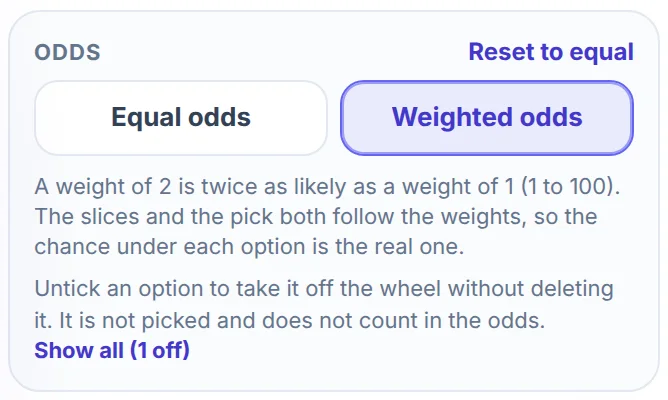
Take three tasks for a Monday morning: write the report, clear the inbox and plan the week. The report is the most urgent, so it gets a weight of 3. The inbox gets 2 and the weekly plan gets 1. The weights add up to 6, so the chances are 3 out of 6 (50%), 2 out of 6 (33.3%) and 1 out of 6 (16.7%).
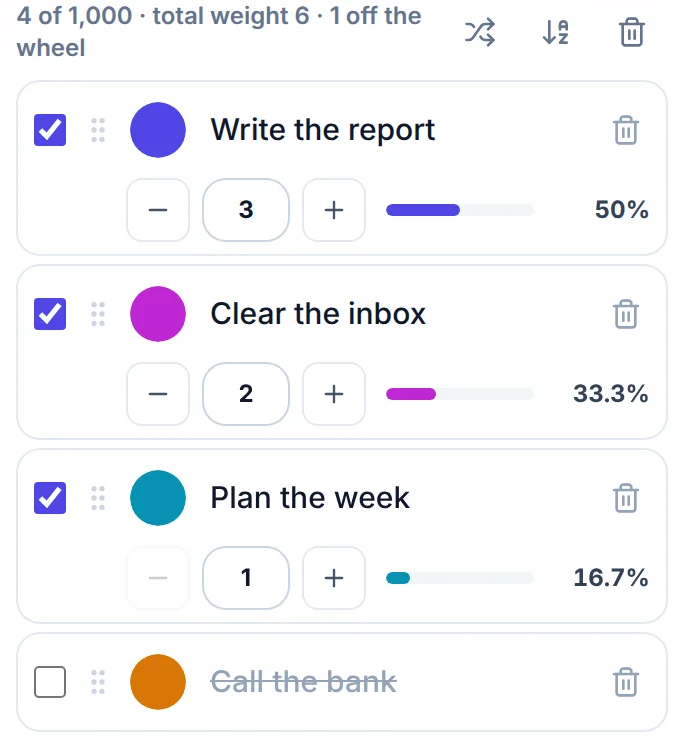
The line above the options also shows the total weight. Reset to equal sets every weight back to 1. Weights are whole numbers, and a number outside 1 to 100 is moved to the nearest end of that range.
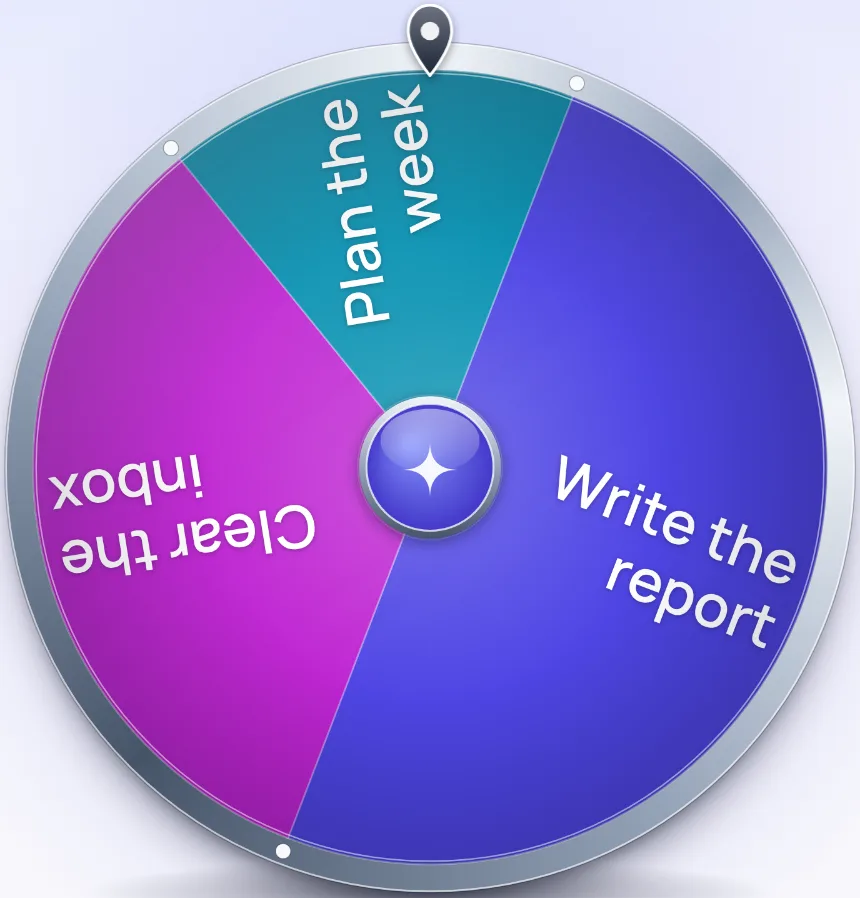
The slices follow the weights too. Write the report takes half of the circle, Clear the inbox a third and Plan the week a sixth. The winner is drawn before the wheel moves, with the same weights as the slices, so the picture and the chance cannot disagree.
Use weights for a real lean, such as a task that is more urgent. If you give your favorite a weight of 100 every time, the wheel is only confirming what you had already decided.
Take an option off the wheel for today
Every option has a tick box on its left. Untick it and the option leaves the wheel but stays in your list, with its name struck through. An option that is off is not picked and does not count in the odds, so the chances of the others add up to 100% again. In the pictures above, Call the bank is off, which is why the wheel has three slices.
Use it for an option that is not possible today, such as a restaurant that is closed or a person who is away, and tick it back on tomorrow. Show all puts every switched-off option back at once.
The wheel needs two options on to spin. If you try to switch off an option and only two are on, a message says "Keep at least 2 options on the wheel so it can spin".
Read the chance on the result card
The card shows the winner and, under it, the chance that option had on that spin. A spin that lands on the weakest option of the example reads "Chance: 16.7%".
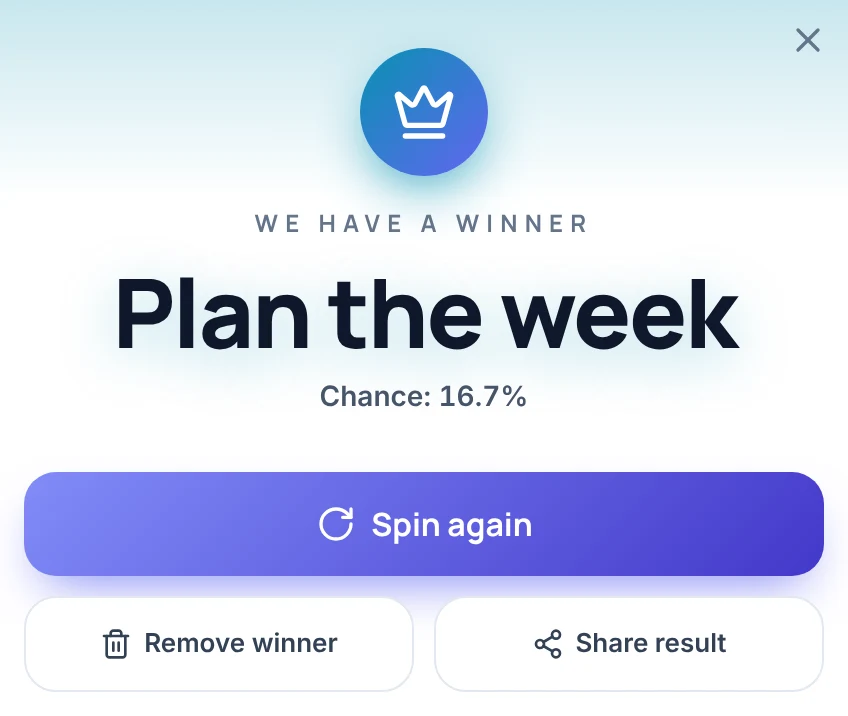
A low chance does not mean something went wrong. An option with a 1 in 6 chance wins about one spin in six over many spins, so it does win. The card reports the odds. It does not predict the outcome.
Spin again is a fresh draw. It does not remember the last result, and the first result does not count unless you agreed beforehand that it would. If you decide to spin until you like the answer, you have decided something, but the wheel did not decide it.
Share result sends the result and a link to this page through your device's share menu, or copies them to the clipboard. In Elimination mode the card has no Remove winner button, because the winner leaves the wheel when you close the card.
Ways to use it for a decision
- What to do first. Type the tasks, choose Weighted odds and give the urgent ones a larger weight, as in the Monday example above.
- A group that cannot agree. Each person adds one option. To give the bigger camp a better chance without letting it always win, weight each option by the number of people who want it. Five votes for pizza and three for sushi give 62.5% and 37.5%, and everyone sees the split before the spin.
- A shortlist from a long list. Put all the options in, choose Elimination under Mode in the Spin tab, and spin once for each place on the shortlist. Each winner leaves the wheel when you close the card, so three spins give three different options.
- An option that is off the table today. Untick it and spin among the rest.
- Two equally good options. Type both and leave Equal odds on. Each option has 50%, and the card reads "Chance: 50%".
What this decision maker wheel does not do
- It does not weigh pros and cons or recommend an option. It picks at random from the options you give it.
- It does not know what is at stake. For money, health or a contract, gather the facts first and use the spin only to settle options you already think are close.
- It does not keep your options when you reload the page. The four starting options come back, so use Save and share first if you want to return to a wheel.
- A saved link or embed does not carry the weights, and options that are switched off are left out of it.
- It has no weight of 0, because weights are whole numbers from 1 to 100. To take an option out of the draw, switch it off.
- It holds up to 1,000 options, and at least two must be switched on to spin.
- The Results tab keeps your last 50 spins, by name only, and it starts empty again after a reload. Copy results copies the list.
More ways to decide
If the choice is yes or no, the Yes or No Wheel gives a bigger answer on screen. For a 3D coin and a tally of flips, use the Heads or Tails Generator. The Food Picker Wheel is built for meals, and the Random Name Picker takes up to 1,000 names for a draw among people. For a playful answer to a question, try the Magic 8 Ball. Any other list goes on the Spin the Wheel page.
Frequently asked questions
A decision maker wheel is an online spinner that picks one option from a list at random. You type your options, press Spin, and the wheel stops on one. It does not weigh pros and cons. It only chooses among the options you give it.
Open the Entries tab, choose Weighted odds and raise that option's weight. A weight of 2 is twice as likely as a weight of 1, and weights go from 1 to 100. The percentage under each option shows its real chance.
Yes. With Weighted odds, the chance of an option is its weight divided by the total of all the weights, and the slices on the wheel are sized by the same weights. The percentage you see is the chance the spin uses.
Yes. Untick the box beside it. The option leaves the wheel, is not picked and does not count in the odds. Tick it again, or press Show all, to bring it back.
When you press Spin, the browser's cryptographic random number generator picks the option first, using the same weights as the slices, and the wheel then turns to land on it. How hard you click does not change the result.
The wheel is fair, but it knows nothing about your options. It suits choices where every option would be acceptable. For a decision with real stakes, gather the facts first and use the spin only to settle options you already think are close.
Agree before you spin that the result counts, and do not spin again just to get a better answer. If a result lets you down, that is worth noticing, and nothing stops you from choosing the other option.
No. Save and share gives a link that keeps the options, their colors and the look of the wheel, but not the weights, and options that are switched off are left out. Note your weights down if you want to set them again.