Color Picker Wheel: Spin for a Random Color With HEX and RGB Codes
Press Spin and the wheel lands on a color, with its HEX and RGB codes.
The color picker wheel picks one random color each time you press Spin and shows its HEX and RGB codes. It works as a random color generator in two ways. The Color list mode spins a list of named colors, such as a rainbow or the Material palette. The Spectrum mode lands on any one of 16,777,216 colors.
Both are free, and every color on the wheel has the same chance. The wheel chooses the color for you: it does not read colors from an image, and it does not let you click a point on a color wheel to read that spot's code.
How to spin a random color
- Choose a mode with the switch at the top of the panel: Color list for named colors, or Spectrum for any color.
- In Color list, pick a list such as Rainbow 7 or Material 16. In Spectrum, choose Any color or Full brightness.
- Press Spin, or Ctrl+Enter (Cmd+Enter on a Mac). In Spectrum you can also click the disc.
- Read the result card. Each value has a Copy button.
On phones and tablets the mode switch and the color lists sit under the Spin button instead of beside the wheel.
What the result card shows
Each spin ends with a card that shows the color as a large swatch. In Color list mode it gives the color's name, its HEX code and its RGB value. When Orange comes up, for example, the card shows #FFA500 and rgb(255, 165, 0).
HEX and RGB are two ways to write the same color. A HEX code is six digits, two each for red, green and blue, so #FFA500 is full red (FF), medium green (A5) and no blue (00). RGB writes the same three amounts as numbers from 0 to 255.
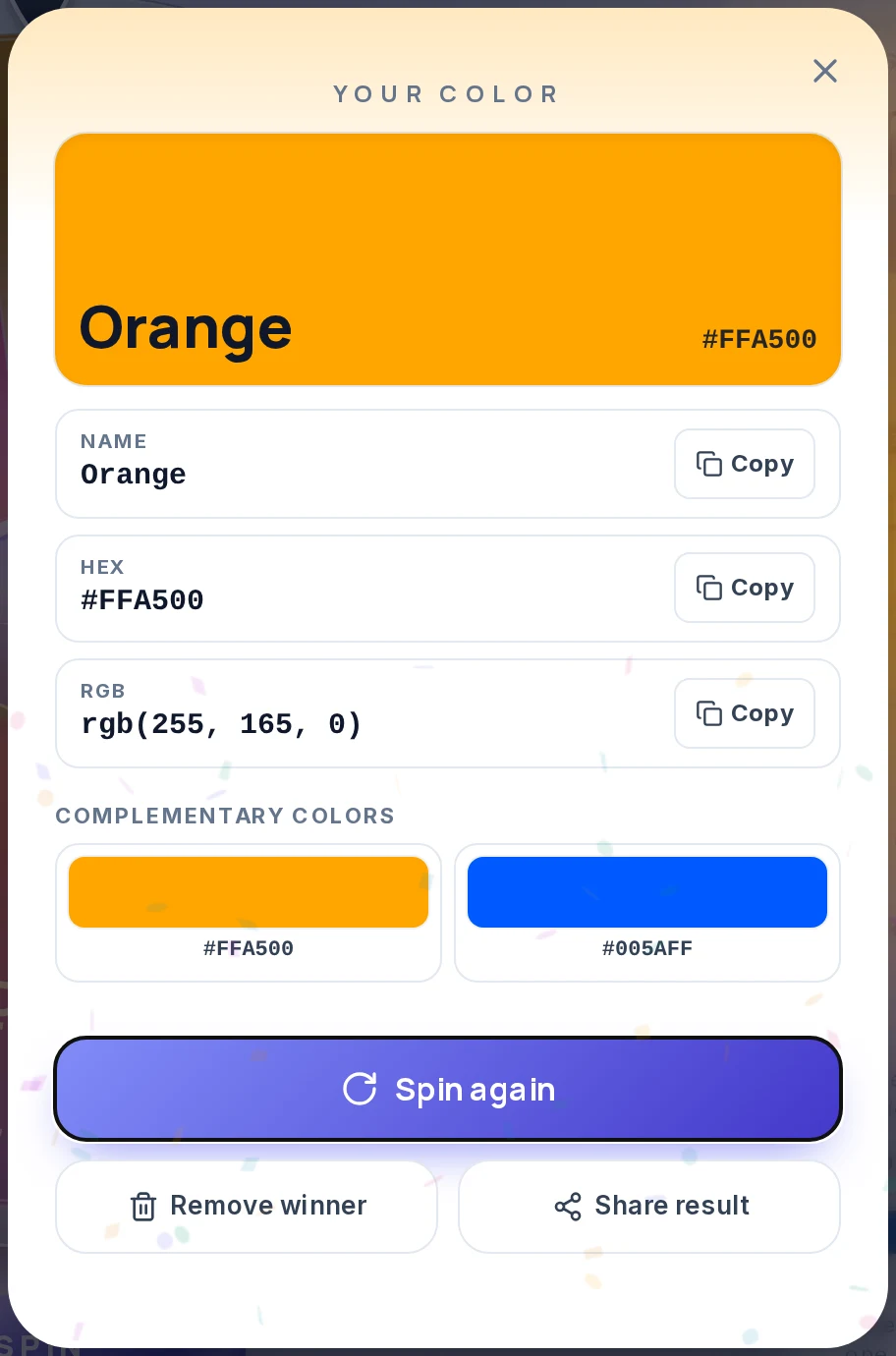
Under the codes the card shows a color combination. It starts with the complementary color, the one opposite on the color circle. For Orange that is the blue #005AFF. The Color combination menu in the Entries tab switches it to Split complementary, Analogous, Triadic or Tetradic. A click on any swatch copies its HEX code.
These combinations are worked out from the color's hue on the screen color circle (HSL), and they keep its saturation and lightness.
Under Show on the result, the Name, HEX and RGB buttons switch each row on or off.
Color lists and your own colors
The Color list mode starts with a Starter 12 wheel and has seven other lists. Picking a list rebuilds the wheel and its entries.
| List | Colors | Where the values come from |
|---|---|---|
| Starter 12 | RedOrangeYellowGreenTealBlueIndigoPurplePinkBrownBlackWhite | CSS color values |
| Rainbow 7 | RedOrangeYellowGreenBlueIndigoViolet | CSS color values |
| Basic 8 | RedGreenBlueYellowMagentaCyanOrangePurple | CSS color values |
| Popular 10 | RedPinkPurpleBlueCyanTealGreenYellowOrangeGray | CSS color values |
| Color wheel 12 | RedOrangeYellowChartreuseGreenSpring GreenCyanAzureBlueVioletMagentaRose | The 12 hues of the RGB color wheel, 30 degrees apart |
| Material 16 | RedPinkPurpleDeep PurpleIndigoBlueLight BlueCyanTealGreenLight GreenLimeYellowAmberOrangeDeep Orange | The 500 shades of the 2014 Material Design palette |
| RGB primaries 3 | RedGreenBlue | The three light primaries at full strength |
| All CSS colors 141 | Every CSS color name, A to Z | CSS color values (the seven "grey" spellings that repeat a "gray" are left out) |
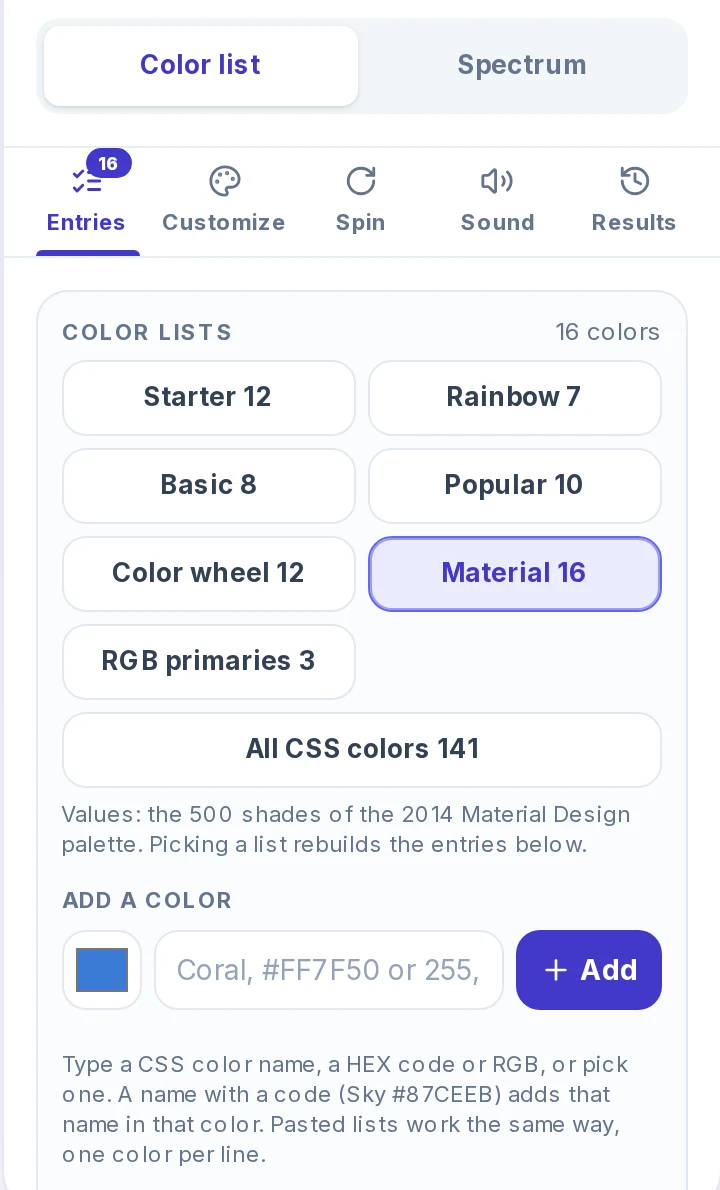
To add a color, type a CSS color name, a HEX code or an RGB value into Add a color, or pick one with the color square beside it, and press Add. A name followed by a code, such as Sky #87CEEB, adds that name in that color. If the box does not know a name, it says so instead of guessing.
For a long list, paste one color per line into Bulk edit, or use Import for a CSV file, an Excel file, a PDF with text or a Google Sheets link. One wheel holds up to 1,000 entries. Pasted lines are read the same way as typed ones: Coral, #3A7BD5 and 255, 127, 80 each give a slice in that color. A word the wheel does not know as a color, such as banana, still goes on the wheel, but it gets a color from the wheel's own palette. Add a code after the word when the color matters.
Spectrum: any one of 16,777,216 colors
Spectrum swaps the list for a color disc. Hue runs round the circle, and saturation grows from white at the center to the full color at the rim. A spin picks one color, turns the disc until that hue sits under the pointer at the top, moves the dot out to its saturation and then dims the disc to its brightness. The dot ends on exactly the color that was picked.
Any color picks from all 16,777,216 colors of 24-bit RGB (256 levels each of red, green and blue), and each one has the same chance. Because every color counts equally, results can be muted or dark as well as bright. Full brightness picks a random hue and saturation and keeps brightness at 100%, so no result is dark. It can still land on a pale color near white when the saturation is low.
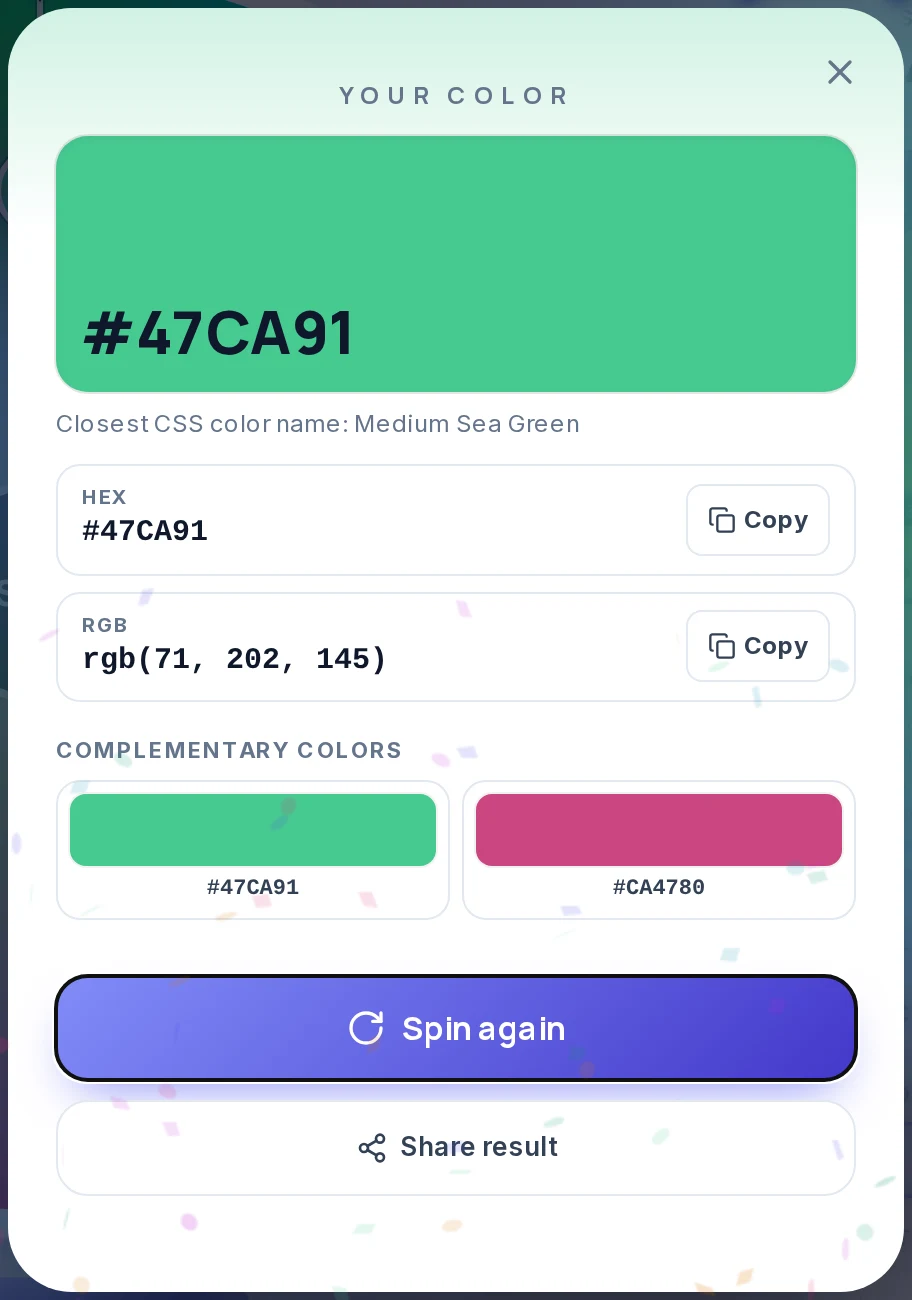
A color from the spectrum has no name of its own. The card uses its HEX code as the title and adds the closest CSS color name as a hint. In the example below, #47CA91 is closest to Medium Sea Green.
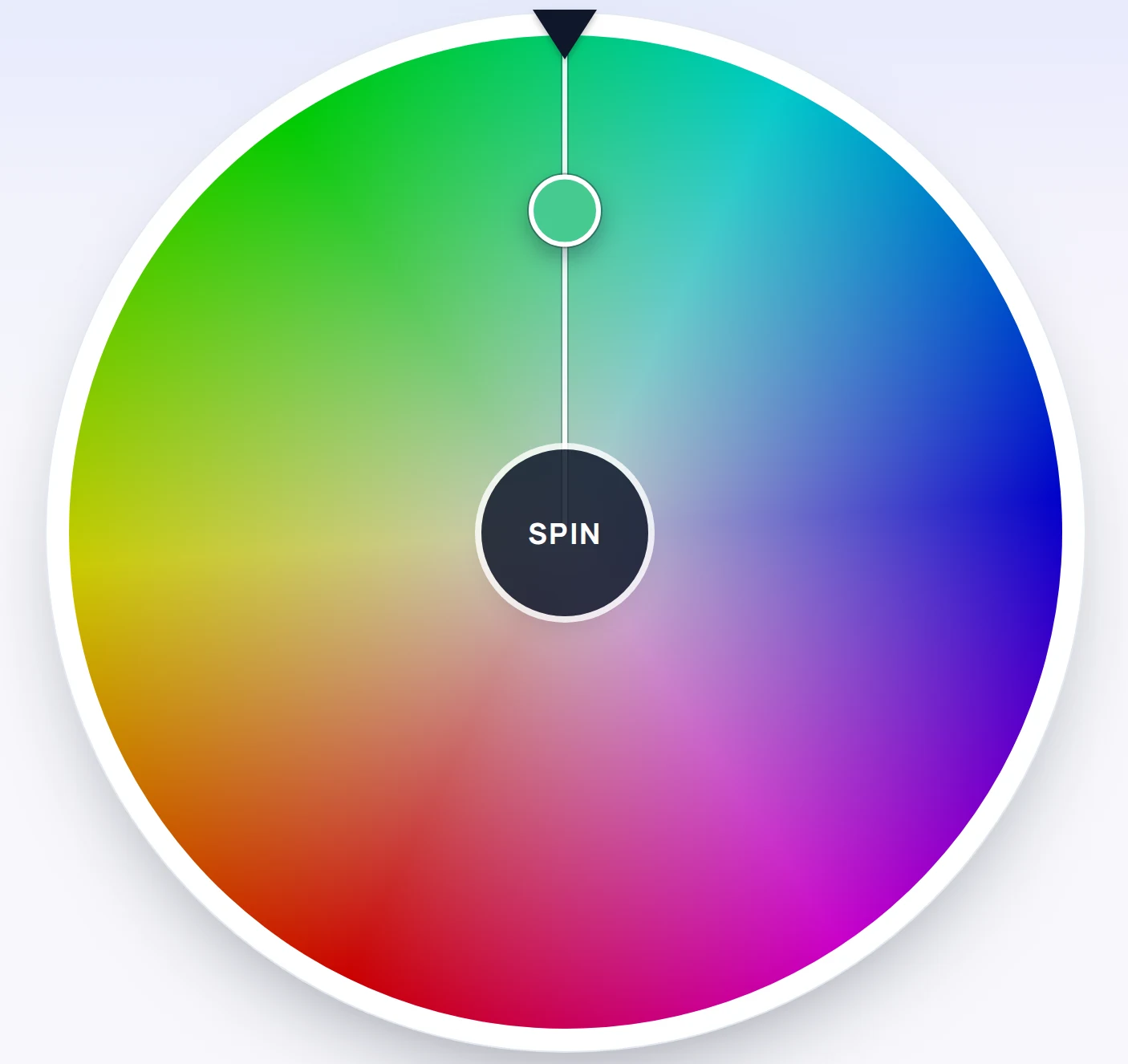
Spectrum has no spin modes either. Spin length (Fast, Normal or Slow, about 3, 5 or 7 seconds) applies to the Color list wheel, and the Spectrum disc always takes about 3.6 seconds.
How the wheel picks a color
The color is chosen by the browser's cryptographic random number generator (crypto.getRandomValues) when you press Spin, before anything starts to move. The animation then turns to the color that was already picked, so the speed or timing of your click cannot influence the result.
On a color list, every entry has the same chance: 1 in 12 on Starter 12, 1 in 7 on Rainbow 7. In Spectrum with Any color, every color has a 1 in 16,777,216 chance.
1 in 12
Each color on Starter 12
about 8.3%
1 in 7
Each color on Rainbow 7
about 14.3%
1 in 16,777,216
Each color in Spectrum with Any color
the same chance for all
Each spin is independent. The same color can come up twice in a row, and a color that has not appeared for ten spins is no more likely to come next. The Entries tab also has a Weights button. Weights give some colors a larger share, so leave them off for an even wheel.
Spin without repeats, or get several colors
The wheel gives one color per spin. To avoid repeats in Color list mode, use either of these:
- Remove winner on the result card takes that color off the wheel before the next spin.
- Elimination mode (Spin tab, Mode) takes each winner off the wheel after you close the card.
Seven teams that each need their own color can use Rainbow 7 with Elimination. Each team spins once, and no two teams end up with the same color.
For a palette from one spin, use the combination row instead. Triadic gives three colors spaced evenly round the circle, and Analogous gives the color and its two neighbors. The tool does not check contrast, so test any text and background pair before you use it.
Where a color picker wheel helps
- Team and group colors. Put the colors on the wheel, then spin once per team or player in Elimination mode.
- Drawing and art prompts. Spin a color, then spin the What to Draw Wheel or the Random Animal Generator for the subject. "Draw a fox using mostly orange and blue" is a full prompt.
- Color games. Spin a color and have everyone find something in the room in that color. It works as a scavenger hunt or a spelling and naming game.
- A starting point for a design. Spin Spectrum with Full brightness for an accent color, copy its HEX code and choose a combination for the companion colors. Judge the result by eye before you keep it.
- Small decisions. For a wall color, a notebook cover or an outfit, type only the colors you would accept as entries. Any result is then fine.
Other wheels for related jobs
- For a subject to draw in your color, use the What to Draw Wheel.
- To split a group into teams before you give each team a color, use the Random Team Generator.
- To choose between color options you already have, the Decision Wheel shows each option's chance.
- For anything else you can list, Spin the Wheel takes your own entries.
Frequently asked questions
It uses the browser's cryptographic random number generator to pick the result when you press Spin, before the wheel moves. On a color list, every color has the same chance, 1 in the number of colors on the wheel. In Spectrum with Any color, every one of the 16,777,216 colors has the same chance.
Yes. Every result card shows a HEX code and an RGB value, each with a Copy button. Colors from a list also show their name, and Spectrum colors show the closest CSS color name.
Color list spins named colors from a list, such as Rainbow 7, Material 16 or your own, and each slice is painted in its color. Spectrum lands on any color a screen can show in 24-bit RGB, so its result has a HEX code and an RGB value but no name of its own.
It keeps the brightness at 100% and picks a random hue and saturation, so no result is dark. Any color does not limit brightness, so it can also land on dark and muted colors.
Yes. Type a CSS color name, a HEX code or an RGB value into Add a color, or pick one with the color square, and press Add. You can also paste one color per line into Bulk edit, or use Import, up to 1,000 entries on one wheel.
Press Remove winner on the result card, or set Mode to Elimination in the Spin tab, which takes each winner off the wheel after you close the card. Without one of these, the same color can come up twice in a row.
They are colors worked out from the result's hue: Complementary, Split complementary, Analogous, Triadic or Tetradic. Choose one under Color combination in the Entries tab. Each keeps the saturation and lightness of the color that came up.
No. The wheel chooses the color at random, and a click on the Spectrum disc only spins it. To use a color you already have, add its name, HEX code or RGB value to a color list instead.