Twister Spinner Online: Automatic, Hands-Free Calls
One limb, one colour, every spin. Use it when the cardboard spinner is lost, or let it call the whole game for you.
This free Twister spinner picks the next move for you: one limb and one colour, such as "Right foot on Blue". Press Spin, click the wheel or press the space bar, and the wheel turns and stops on one of the 16 calls. It runs in a browser on a phone, tablet or computer, and it needs no app and no account.
It can also run without anyone touching it. In hands-free mode the wheel spins again by itself 5, 10 or 15 seconds after each result, and it can read every call aloud, so nobody has to leave the mat to press a button.
How to use the Twister spinner online
- Choose what each spin calls. Open the Entries tab and look at Each spin calls. Full call gives a limb and a colour in one spin, and it is the default. Limb only and Colour only are for groups that call the other half themselves.
- Spin. Press Spin, click the wheel or press the space bar. The wheel turns for about 5 seconds and then a card shows the call. Under Spin length in the Spin tab, Fast takes about 3 seconds and Slow about 7.
- Move the limb. The card shows a hand or foot picture, a dot in the mat colour and the words, for example "Right foot on Blue". Every player moves that limb to a circle of that colour.
- Spin again. Use Spin again on the card. While a card is open the space bar does not spin, so close the card first if you prefer the keyboard.
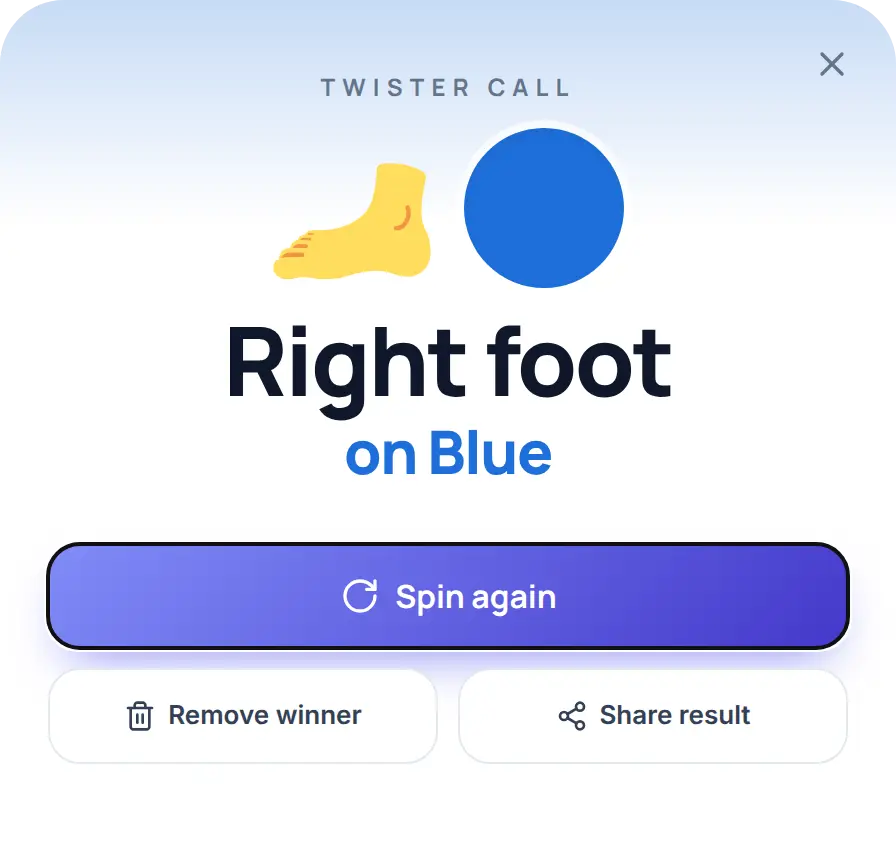
If anyone asks what the last call was, open the Results tab. Winner history numbers every call in order, and Copy results copies the list. On a phone, the call choice, hands-free buttons and voice button sit under the wheel instead of in a side panel.
The Twister spinner wheel: 16 calls
The wheel has 16 slices, one for every pairing of a limb (Left hand, Right hand, Left foot, Right foot) with a colour (Red, Blue, Yellow, Green). That is the same layout as the board-game spinner, which Wikipedia describes as four labelled sections, each split into the four colours.
Each slice is painted its mat colour and carries a hand or foot picture. The slices run limb by limb, so two neighbouring slices never share a colour. All 16 are the same size, so each call has a 1 in 16 chance, which is 6.25%. The pictures show a hand or a foot only, so read the words to tell left from right.
| Setting | One spin gives | Slices | Use it when |
|---|---|---|---|
| Full call (default) | A limb and a colour, for example Left hand on Red | 16 | You have no spinner at all |
| Limb only | One limb: Left hand, Right hand, Left foot or Right foot | 4 | A real spinner or a caller already gives the colour |
| Colour only | One colour: Red, Blue, Yellow or Green | 4 | A real spinner or a caller already gives the limb |
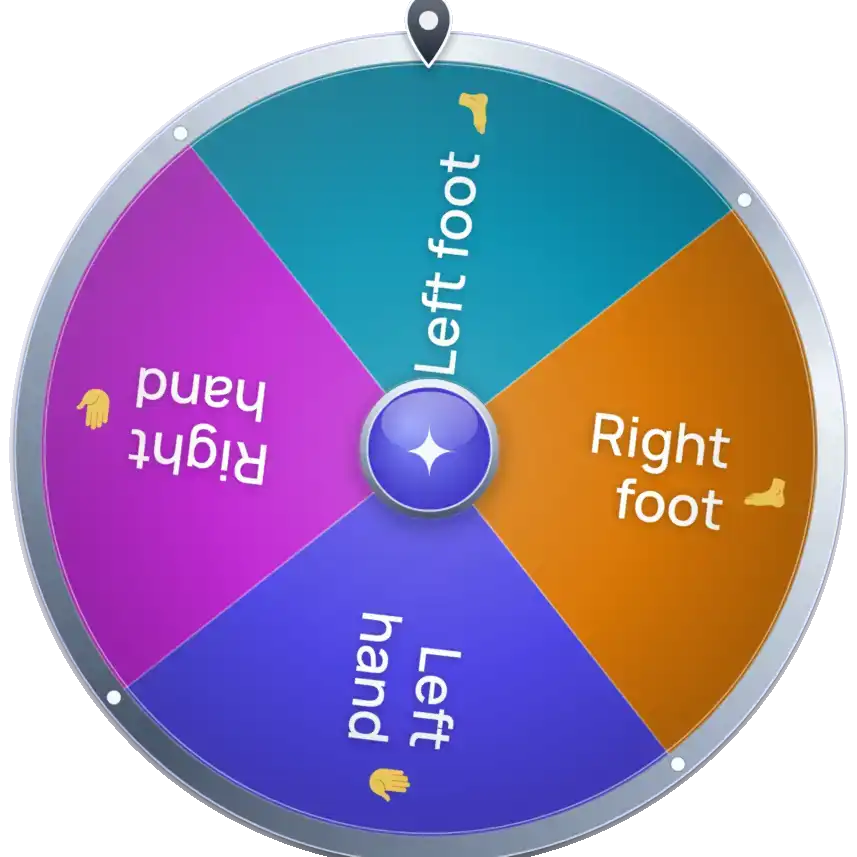
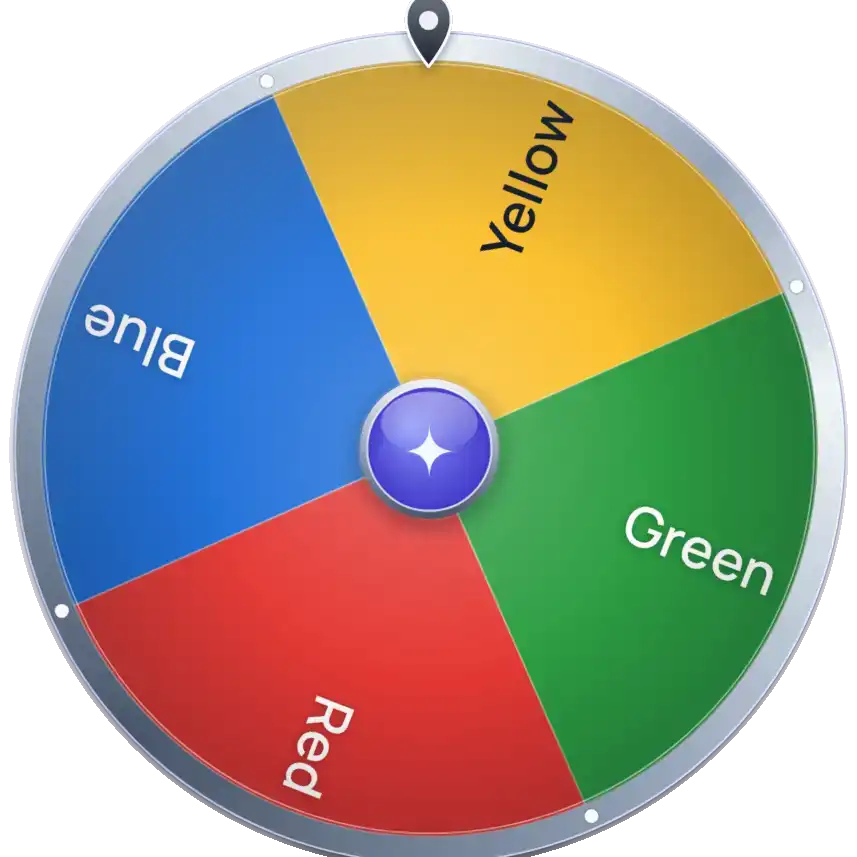
Switching between the three settings rebuilds the wheel with the entries for that setting.
Automatic Twister spinner: hands-free mode
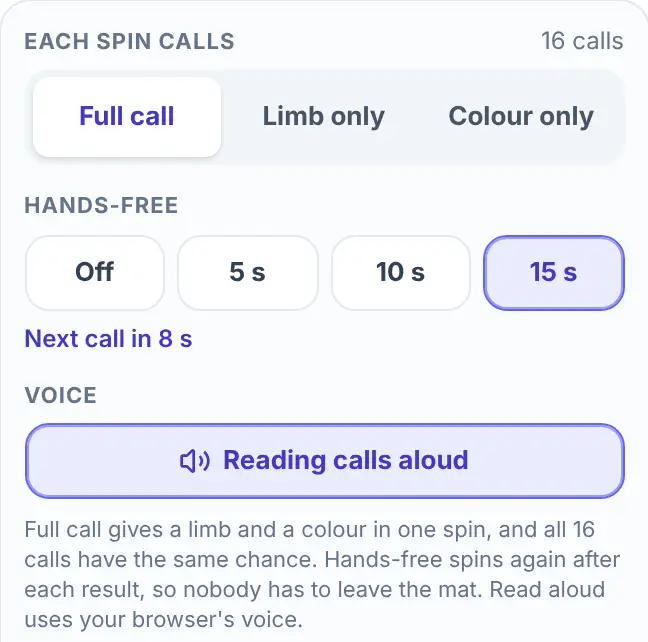
Hands-free mode turns the wheel into an automatic Twister spinner. In the Entries tab, under Hands-free, choose 5 s, 10 s or 15 s. The wheel spins straight away. After every result it waits that many seconds, shows "Next call in 8 s" or the number that is left, and spins again. Choose Off to stop.
Some details that help when you plan a game:
- The pause is on top of the spin. The countdown starts when the result appears. With a 5 s pause and the Normal spin length (about 5 seconds), a new call comes roughly every 9 to 10 seconds. A short pause keeps the game quick. A 15 s pause gives players time to reach.
- The old card closes by itself. When the next spin starts, the card from the last call disappears, so nobody has to tap it.
- The countdown waits when you leave the tab. If you switch to another browser tab, the pause starts its full time again when you come back.
- Read calls aloud. Under Voice, the Read calls aloud button makes the browser say each call when it lands, for example "Right foot, blue." It uses your browser's voice, so the voice and the language depend on your device. The button only appears in browsers that can speak.
Hands-free mode also removes the caller. Nobody has to step off the mat to press Spin, and with Read calls aloud on, players can hear each call without looking at the screen.
Twister spinner app or browser?
You do not need an app. This Twister spinner is free to use and works in a normal browser tab, so you open the page and play. There is nothing to download and no account to make.
Apps do exist in the app stores. According to their listings, some let you start a spin by voice, and some charge for the full version. This page does not take voice commands. It speaks the calls, but it does not listen. If you want to say "spin" and have a spin start, pick one of those apps. If you want a link that opens on any device with a browser, use this page.
Before a long game, raise the phone's auto-lock time. The page has no setting to keep the screen on, so the screen can go dark between hands-free calls.
Playing with a mat, a real spinner or neither
- Lost the spinner but kept the mat: use Full call. The wheel gives the same 16 calls as the cardboard spinner.
- Want a spinner that calls by itself: use hands-free mode and put the screen where every player can see it.
- Using a real spinner for one half: switch to Limb only or Colour only and call the other half your usual way.
- No mat at all: put down four rows of coloured paper circles, one colour per row, and use the same calls on them.
The wheel only calls moves. You referee the rest. According to Wikipedia, a player is out when they fall or when an elbow or knee touches the mat, and the last player left wins.
Why the same call can come up twice
The spinner has no memory, so past calls do not change the next one. That makes some streaks normal:
- After any call, the next call is exactly the same one in 1 of 16 spins, which is 6.25%.
- The next call uses the same limb in 1 of 4 spins.
- In a game of 8 calls, a given limb, such as Right foot, is never called about 10% of the time.
- In a game of 16 calls, a given call, such as Left hand on Red, never appears about 36% of the time.
These are equal chances, not equal shares. Over a long game each limb and colour evens out, but a short game is rarely balanced. The probabilities are arithmetic (3/4 to the power of 8, and 15/16 to the power of 16).
What this Twister spinner does not do
- It does not track the mat. It does not know which circles are taken or who is out. If every circle of the called colour is full, your group decides what happens. Pressing Spin again is the simplest rule.
- It has no voice input and no pause button. Choose Off to stop hands-free mode. After Off, choosing a time again spins straight away.
- It does not know your players. It calls one move at a time. To decide who plays the next round, use the Random Name Picker below.
- Remove winner takes a call off the wheel. The card has this button, but a normal Twister game does not need it. Switch to another call type and back to Full call to get all 16 calls again.
Other wheels for game night
- To choose who plays next in a big group, use the Random Name Picker.
- To pick a player at random for any circle game, use Spin the Bottle.
- For a game where players act out words, use the Charades Generator.
- For questions and challenges between rounds, use the Truth or Dare Wheel.
Frequently asked questions
Open the page, leave Each spin calls on Full call and press Spin, click the wheel or press the space bar. The wheel stops on one call, such as Left hand on Green, and a card shows it. Each player moves that limb to a circle of that colour.
You do not need one. This page is a free Twister spinner that runs in your browser on a phone, tablet or computer, with no download and no account. Some store apps start a spin by voice, which this page does not do.
Yes. Under Hands-free, choose 5 s, 10 s or 15 s. The wheel spins right away, and then spins again that many seconds after each result until you choose Off.
Yes, in browsers that can speak. Switch on Read calls aloud and the browser says each call, such as "Left foot, green", when the wheel stops. The voice comes from your browser, so it differs between devices.
Yes. The wheel has 16 slices of the same size, so each call has a 1 in 16 chance. The page picks the call with your browser's cryptographic random number generator before the wheel starts to move, so the timing of your click cannot change it.
Yes. Each spin is independent, and the same exact call follows a call in 1 of 16 spins. The same limb follows in 1 of 4.
Yes. Switch to Limb only or Colour only, and the wheel gives only that half of the call. You call the other half the way your group already does.